 rebalio
Connect your exchange
Bring your holdings into view with a secure exchange connection.
Self-hosted. Free to use.
Simple personal wealth management for everyday investors.
Bring your accounts together and make it easy to follow your plan.
Your funds stay on your exchange. You set the rules.
More accounts. More checking. Still wondering if you're on track?
Rebalio turns scattered investments into a plan you can follow.
Connect your exchanges and see your portfolios together.
Know what's in balance, and what needs your attention.
Give each asset a target, so your portfolio reflects your strategy.
And leave selected holdings untouched.
Preview a fresh rebalance plan.
Review and approve each rebalance.
Stop further orders at any time.
Give your cash a strategy, too.
Cash rules adjust your cash target within limits you set, as your portfolio value changes.
Runs on your host. Funds stay on your exchange.
Local sign-in. Agents plan. You approve trades.
Less checking. More clarity. One plan to keep following.
All features included. Install Rebalio at Rebalio dot app.
Synthetic narration: Niki. Music: “Digital Clouds” by Alejandro Magaña (A. M.), from Mixkit, under the Stock Music Free License.
Connect your exchanges and brokerage
 Binance





A simpler routine
Bring your holdings into view with a secure exchange connection.
Pick the assets, cash allocation, and rules that fit your plan.
Preview the proposed trades and approve each rebalance yourself.
Interactive Dashboard
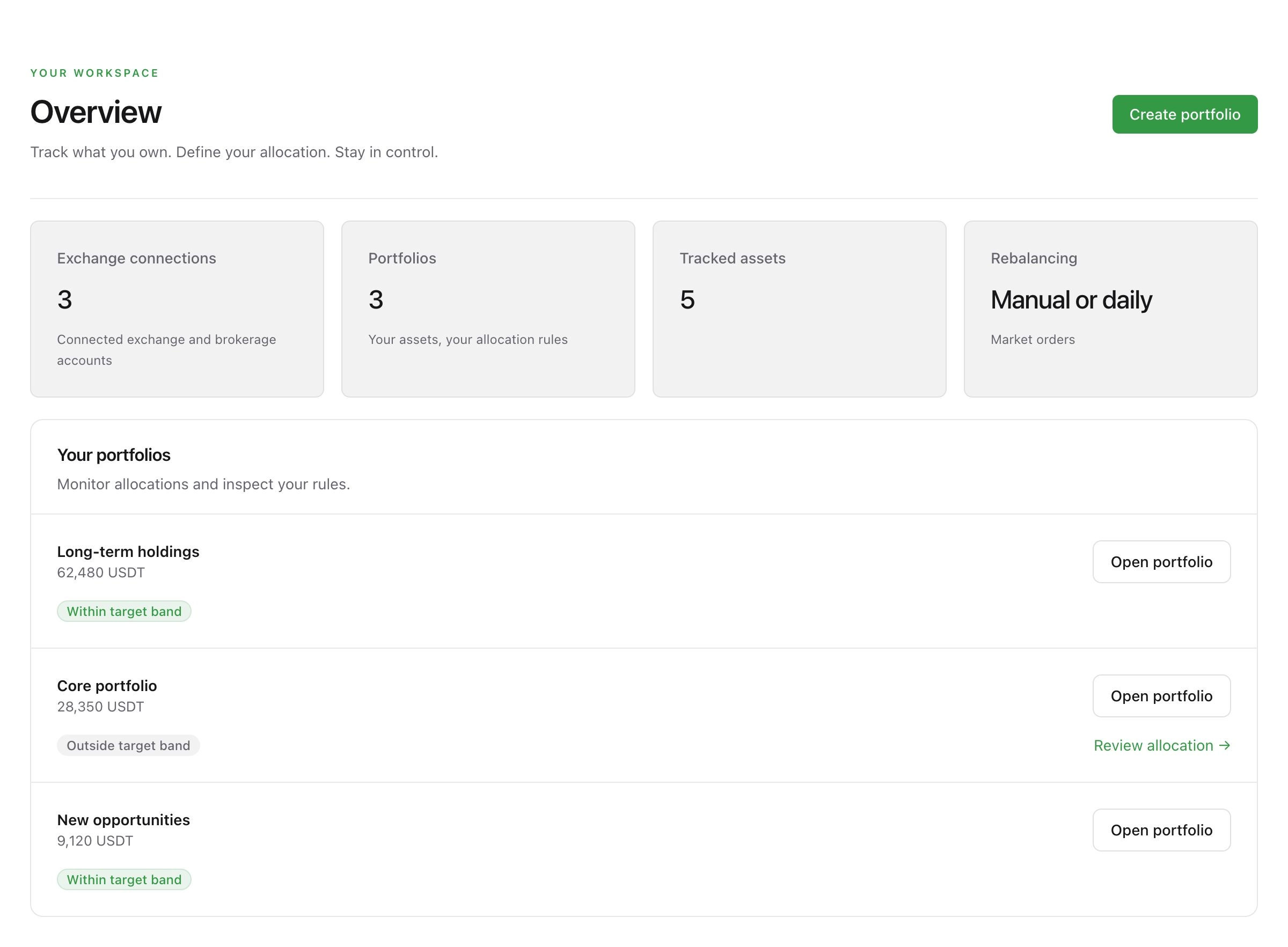
See the combined USD value of your accounts and holdings, including assets outside your portfolios. Explore your top 10 holdings and keep an eye on what needs attention.
See each account’s USD value and an All accounts summary with a holdings breakdown.
See which portfolios are within their allocation ranges and which need a closer look.
Smart Rebalancing
Prices move. Your plan doesn’t have to. Rebalio checks each asset against your chosen allocation range and prepares a rebalance for your approval to bring out-of-range holdings back toward their targets.
Preview the proposed trades, then approve the rebalance when you’re ready.
Give your holdings room to move within the allocation ranges you choose.
Check fresh balances and see the proposed changes.
You decide whether to place the proposed orders.
Check order status and review your activity history.
Cash Management
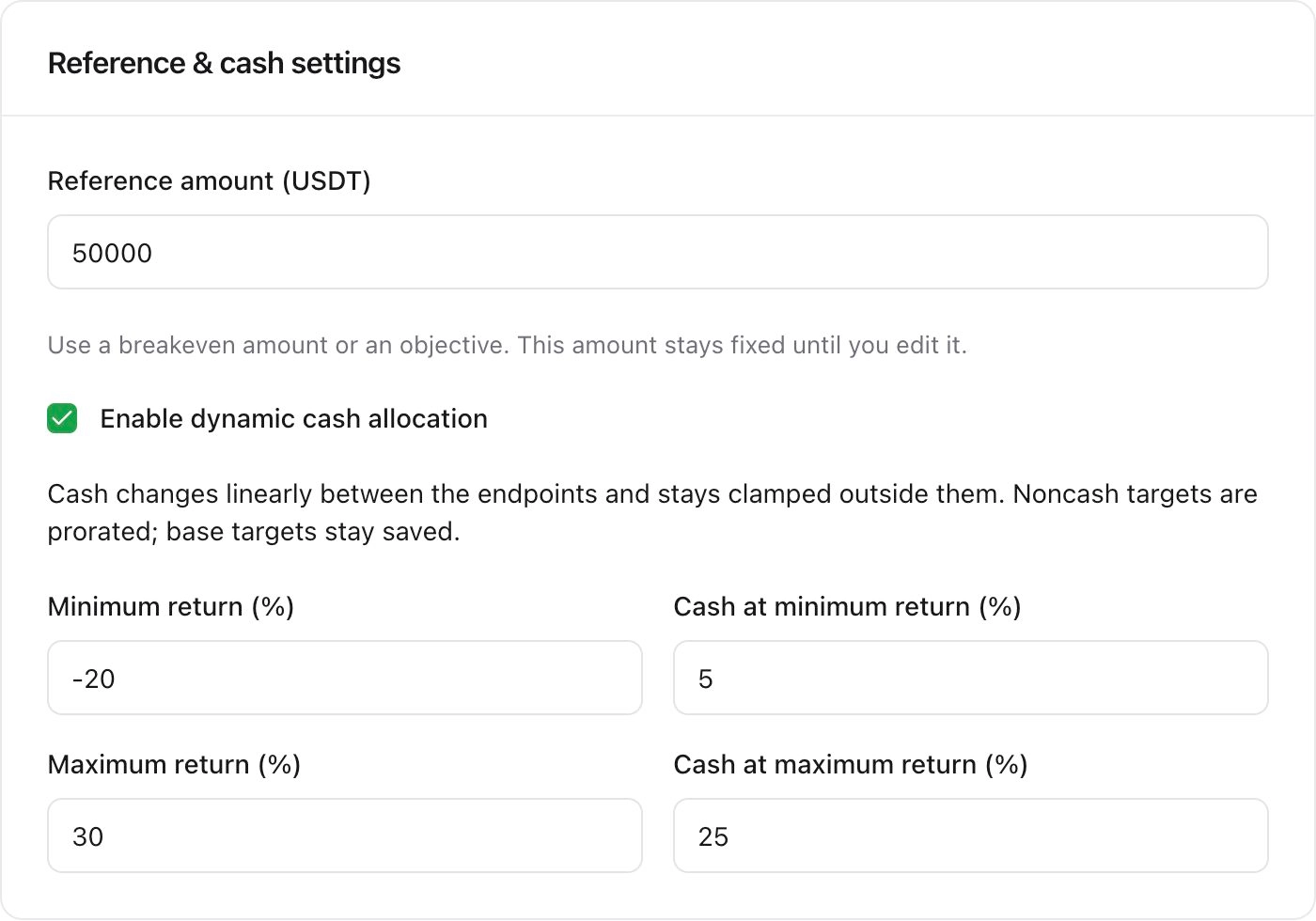
Decide how much to keep in cash as your portfolio changes. Set your limits and a reference amount. Rebalio adjusts the cash target using the rules you choose.
Choose the minimum and maximum cash percentages, and when each should apply.
As the cash target changes, the remaining target allocation keeps the same relative split between assets.
Custom Allocations
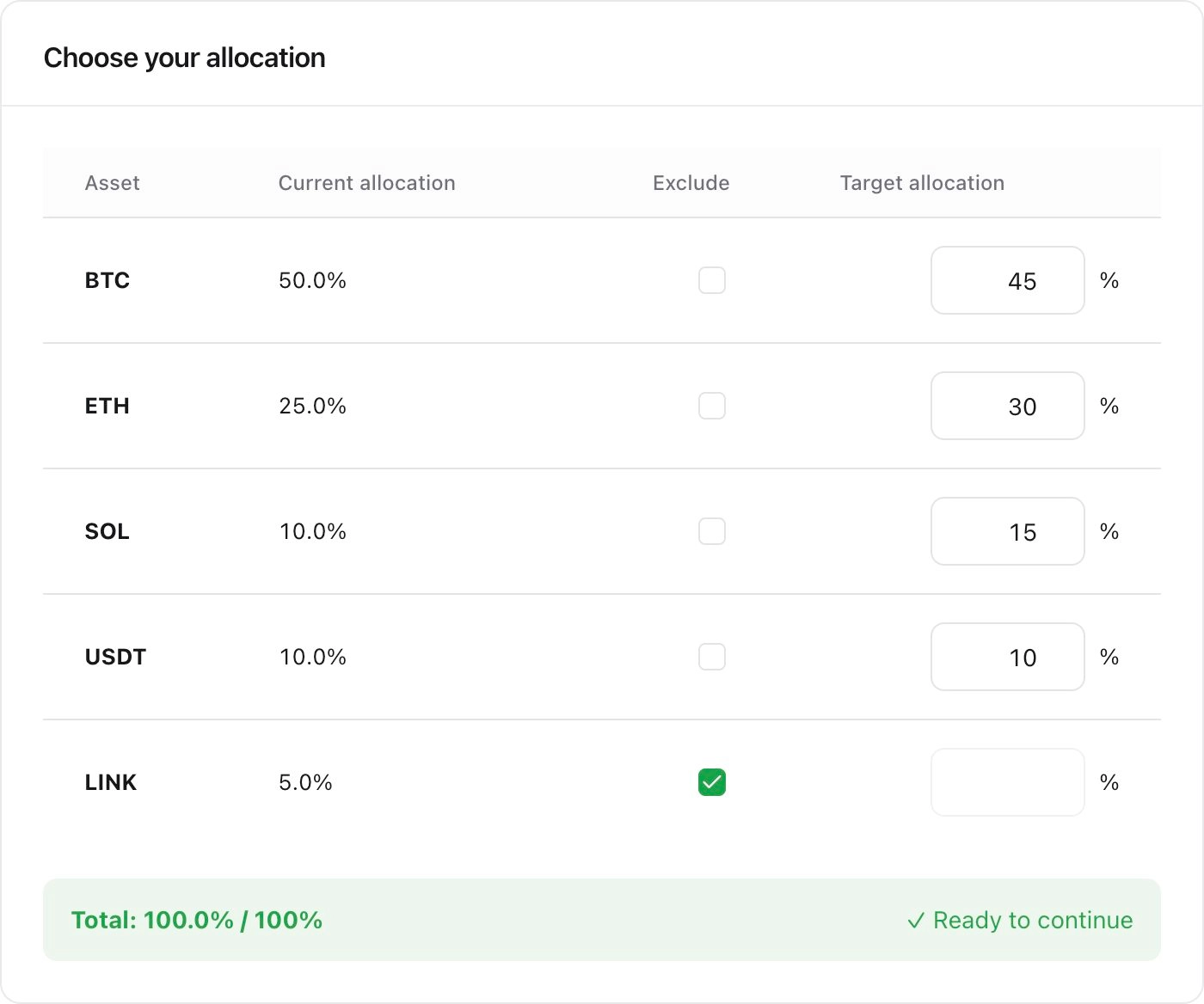
Decide what share each asset should have. Add supported assets, enter your percentages, and choose which holdings Rebalio should manage.
Set whole-number percentages that add up to 100%, including your cash allocation.
Exclude holdings from management while keeping them visible in your account.
Built around your control
Run Rebalio on your computer, home server or VPS and open your private workspace in your browser. Your installation connects directly to your exchanges, so your assets stay where they belong.
Monitor your holdings while your host is running. When you’re ready to rebalance, review the proposed trades and approve them yourself.
Connect your existing exchange account. Your funds stay on your exchange.
Encrypted storage on the host you control. No cloud portfolio account.
Secure authentication protects access to your installation.
Start with read access. Enable trading if needed, keep withdrawals disabled and approve every rebalance.
A few common questions
Install Docker, download the Compose file and start Rebalio. Create your local owner account using the setup token from the host, then connect an exchange. All features are included.
Get startedFunds stay on your exchange. Credentials and portfolio data are encrypted on your own host. Keep withdrawal permissions disabled.
Security and privacyNo. Rebalio prepares a proposal for you to review and approve. Your agent cannot bypass this approval.
Review a rebalanceRebalio is free to use for personal or internal business use. All features are included, with no subscription or activation key. Your hosting costs and exchange fees are separate.
Install RebalioAll features included
Connect your exchange accounts, monitor holdings and track allocations with Rebalio. Your encrypted database stays on the host you control.
Install Rebalio →Your agent, connected
Copy your MCP URL in Settings and follow the Claude Code, Codex, OpenClaw, Hermes or generic client guide to inspect portfolios and prepare rebalance proposals. Review and approve in your private workspace before any order reaches your exchange.
How agent access works →Your portfolio. Your rules.
Simple personal wealth management that helps you follow your plan.
Get started